

Showing posts with label Rapidleech Tutorial. Show all posts
Showing posts with label Rapidleech Tutorial. Show all posts
Download RapidLeech v3.42.5 Custom Updated on 11-07-2011 Free - 105 Plugins Latest Working Version!
This summary is not available. Please
click here to view the post.
How do I split files on Rapidleech and join them after I have downloaded to my PC?
Say you have a file on webserver. [mm.mp4] You splitted it using rapidleech split option in suppose 2 parts. You will get 3 files
HJSplit is a popular freeware program to split and recombine files. The program is available on Windows, Linux and a variety of other platforms.
Why should one want to split and recombine files? For instance, think of a file of 50 Mb, and try to send it to a friend, post it in a newsgroup or upload it to a Website or FTP server. It is usually easier to send/receive, upload/download smaller parts than handle the entire file in one go.
HJSplit can also be useful for backups. A file of e.g. 10 gigabytes in size can be split into smaller parts which then can be burned to CD's, DVDs, copied to USB sticks or uploaded to an online backup service.
HJSplit for Windows and Linux support file sizes of over 100 Gigabytes, MD5 checksums, file-compare, "run without install" and both editions are fully portable.
mm.001 mm.002 mm.crc
Download all these files to your PC and put them in 1 folder
Download the software: http://www.freebyte.com/hjsplit/
Run the software select the .crc or .001 file and click join.
How To Set Up Premium Accounts For Rapidleech? How to add Your Premium Accounts in your rapidleech ?
How To Set Up Premium Accounts For Rapidleech ?
How to add Your Premium Accounts in your rapidleech ?
method 1
1. Login to cPanel by given Username Password in your Account Welcome Email.
2. Click 'Legacy File manager' Option ' after logging in your cPanel.
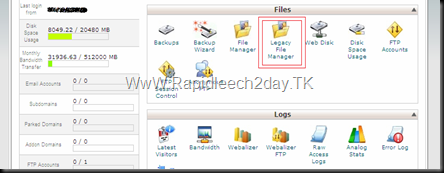
How to add Your Premium Accounts in your rapidleech ?
method 1
1. Login to cPanel by given Username Password in your Account Welcome Email.
2. Click 'Legacy File manager' Option ' after logging in your cPanel.
How to Password Protect Your RapidLeech Script ? How to setup password on rapidleech? how to secure my rapidleech?
 How to Password Protect a RapidLeech Installation ?
How to setup password on rapidleech? how to secure my rapidleech? quick quide to make your Rapidleech password protected
Introducing USA 1Gbps Premium sBorg Hosting with Pre-Installed latest sBorg

USA 1Gbps Premium sBorg Hosting with Pre-Installed latest sBorg, Enjoy fastest Speeds and Unmetered Bandwidth
RapidLeechHost.com have started new Premium sBorg Hosting on USA 1Gbps servers. All Accounts comes with these unique features :- Latest sBorg Pre-installed Included with all packages, just order and get started.
- USA 1Gbps servers to provide best speeds to Fileserve, Hotfile, MegaUpload and other USA based hosts
- Enjoy the latest sBorg with 1Gbps fastest Speeds and Unmetered Bandwidth
- We provide free installation of sBorg on your account and you don't need to buy any install tickets from sBorg website.
- And the biggest benefit is : Our sBorg Servers support Torrent Leeching so you can download Torrents and it will re-upload them to your favourite hosts automatically.
The Introductory Prices are very affordable, 30GB Packages starts with $12.99/month and 50GB packages for just $15.99/month
We offer 10% Discount on Quarterly payments, 20% Discount on Semi-Annual Payments and 30% Discount on Annual Payments.
To know more and order, checkout this page : Rapidleechhost
If you have any other queries, feel free to contact Sales Department via Support Tickets.

Rapidleech & White Page & Not Working Hosts

the reason that white page is an incompatibility hosting with the requirements of Rapidleech script
List of Not Working Hosts
- 000webhost.com
- 275mb.com
- 3-hosting.com
- 1111mb.com
- 4000webs.com
- byethost.com
- sitegoz.com
- t35.com
- hostgator.com (Limits script execution to 25 minutes)
Your host might not support PHP
How to use Rapidleech Script - Installing Rapidleech - Requirement
How to use Rapidleech Script - Installing Rapidleech - Requirement
PHP Requirement to use rapidleech scrip
- safe_mode off Well, safe_mode can be turned on but you will need some knowledge of PHP to customize and make some workarounds.
- fsockopen enabled Check this through phpinfo(), if fsockopen is listed under disable_functions Rapidleech cannot work.
- allow_call_time_pass_reference On This isn't strictly required, but it will produce annoying messages across the pages.
- allow_url_fopen On
- memory_limit larger than 32MB Or you won't be able to download some large files
- cURL support enabled This is required to check links
- output_buffering Off This is required to show the progress bar during download, although there are workarounds even if this is turned on
Installation Guide :
- Download latest Rapidleech From This Here
- Unzip The File Using Winrar or anything you like in a folder on your PC
- Then Open Your Cpanel Which Your Hosting Company Has Given You.
- Then search For A Icon Of File Manager , then click on it .
- Then search For A File Named "public_html" , open it.
- There Will be many files in it , create a new folder in Public_Html , name it any thing you like.
- Then upload all the files unzipped at step no. 2 in a folder to that new folder that you have created in your Public_html
- There will Be a Folder Named "Files" within the files that you have currently uploaded . Right Click On It there Will Be A Option of "Change Permissions", click on it
- A Box type Structure Will Appear,Check All the boxes In the Menu or input the values as 777
- Go to your site www.example.com/name of the folder that you Created At step 6
- Your Rapidleech is working
Troubleshooting:
If Rapidleech some how doesn't work, create a file named phpinfo.php under the root directory of your public_html. Inside phpinfo.php, put the following content:<?php phpinfo(); ?>
If you have Rapidleech on the root folder of public_html, add this to your .htaccess:
<files phpinfo.php>
Allow from all
</files>

About RapidLeech Script
How to install Rapidleech script on your PC
How to install Rapidleech script on your PC
Download Rapidleech Script
Or
Or
Download wampserver
how to use rapidleech
Rapileech2day Archives
How to use rapidleech to get high speed download
How to use rapidleech to get high speed download
Using Rapidleech


Subscribe to:
Posts
(
Atom
)
 Subscribe in a reader